
Star Wars: Galactic Racer – 12 Essential Tips to Win More Races
Master Star Wars: Galactic Racer with 12 essential tips covering vehicle selection, upgrades, shortcuts, Ramjet boosts, and Tour Mode survival.
Star Wars: Galactic Racer is a much tougher racing game than it might appear during your first few races. Combining fast-paced arcade driving, aggressive rival encounters, and roguelike progression, it demands more than simply holding down the accelerator. A poorly timed Ramjet boost, a missed shortcut, or an unnecessary collision can turn a promising Tour Mode run into a complete disaster.
The challenge becomes even greater as you progress through the game. You need to understand your vehicle’s strengths, manage your upgrades, learn the tracks, and decide when taking a risk is actually worth it. Some mechanics also take time to master, meaning a few failed attempts are almost inevitable.
Whether you’re struggling to survive longer Tour Mode runs or simply want to leave your rivals behind, these 12 Star Wars: Galactic Racer tips will help you improve your driving, make smarter decisions, and get more out of every race.

12 Essential Star Wars: Galactic Racer Tips for Beginners
1. Learn to Accept Defeat
Losing might not sound like the most exciting advice for a racing game, but failure is a natural part of Star Wars: Galactic Racer. Your opponents aren’t just trying to beat you on the track. They’ll also look for opportunities to ram your vehicle, push you off the racing line, and punish even the smallest mistakes.
Add vehicle upgrades, special abilities, shortcuts, and environmental hazards to the mix, and it’s easy to see why mastering everything immediately isn’t realistic.
Instead of treating every defeat as a sign that you’re doing something wrong, use it as an opportunity to learn. Pay attention to the corners where you lose control, the shortcuts that cost you time, and the situations where your vehicle struggles to keep up.
Every failed attempt teaches you something about the game’s mechanics. Once you start recognizing patterns and adjusting your approach, you’ll find that races become much more manageable.
2. Prioritize Survival Over First Place
One of the biggest mistakes you can make in Tour Mode is treating every race as if winning is the only acceptable outcome.
Depending on the event, finishing third or fourth may be enough to collect credits and continue your run. Throwing away an otherwise successful tour because you desperately wanted first place can be far more damaging than accepting a less impressive result.
This is particularly important when you’re still learning a track or using a vehicle that doesn’t suit your driving style. Taking unnecessary risks, crashing repeatedly, and pushing your vehicle beyond its limits can jeopardize your entire run.
Of course, some events require you to win to progress. In those situations, you’ll need to be more aggressive. But when the game gives you room to settle for a respectable finish, take advantage of it.
Consistency is often more valuable than a single spectacular victory. Survive the race, earn your rewards, improve your vehicle, and save your biggest risks for moments when they genuinely matter.
3. Choose the Right Vehicle for Your Playstyle
Tour Mode features three main vehicle types, each offering a different approach to racing. Choosing the right one can make a noticeable difference, especially when you’re still getting comfortable with the controls.
- Landspeeder: A balanced option with reliable handling, accessible drifting, and solid durability. It’s a good starting point for players who prefer a forgiving vehicle that can withstand a few mistakes.
- Speeder Bike: A smaller, more agile vehicle that rewards precise cornering. Its ability to build turbo after drifting makes it particularly effective in the hands of players who can maintain a clean racing line.
- Skimmer: Less nimble through corners but powerful on straight sections. It also offers advantages in physical encounters, making it a suitable choice for players who prefer a more aggressive approach.
Don’t automatically choose the vehicle with the highest numbers on its statistics screen. A theoretically faster vehicle won’t help much if you struggle to control it through tight corners.
Experiment with different options in Arcade and Scenario modes before committing to a particular vehicle during a longer Tour Mode run. Finding a machine that matches your instincts can be more valuable than chasing the highest performance rating.

4. Upgrade Cornering and Speed First
Vehicle upgrades are essential to long-term progress, but spending credits without a clear plan can leave you with an expensive collection of parts that don’t solve your biggest problems.
For a reliable early-game approach, prioritize Cornering and Speed.
Cornering helps you maintain control and carry more momentum through bends. Since many tracks punish players who brake too much or take corners poorly, improving this attribute can save valuable time throughout a race.
Speed is equally straightforward. A higher top-speed potential helps you keep up with faster opponents and capitalize on long straight sections.
These upgrades are particularly useful before you’ve settled on a specialized vehicle build. Once you understand your preferred vehicle and the parts that work best with it, you can start investing more heavily in durability, battery capacity, or other specialized attributes.
The key is to identify where you’re losing time before spending your credits. If you’re consistently falling behind through corners, Cornering should take priority over an upgrade that offers little benefit to your current driving style.
5. Practice Tracks in Arcade and Scenario Modes
Tour Mode might be the main attraction, but the other single-player modes are valuable training grounds.
Arcade and Scenario modes let you experience different tracks and vehicles without the same pressure of protecting a longer Tour Mode run. This makes them ideal places to experiment with risky routes and unfamiliar mechanics.
When practicing a track, focus on three things:
- Dangerous corners: Learn where you need to adjust your speed and how to avoid losing control.
- Shortcuts: Identify their entry points and figure out how much speed you can safely carry into them.
- Ramjet opportunities: Look for long, relatively safe sections where you can use powerful boosts without immediately risking a crash.
Learning a track in advance means you’ll spend less time wondering where to go during a critical Tour Mode event. Instead, you can concentrate on your rivals, manage your boosts, and react to unexpected situations.
A little preparation can make the difference between a frustrating race and a comfortable finish.
6. Learn the Shortcuts Before Using Them in Tour Mode
Shortcuts are a familiar feature in racing games, but their value in Galactic Racer varies considerably. Some save only a fraction of a second, while others can remove several seconds from your overall time.
The problem is that the fastest route isn’t always the safest one.
Entering a shortcut at the wrong angle or carrying too much speed into a tight section can cause a crash that costs you far more time than the shortcut would have saved. This is especially dangerous during a Tour Mode run, where a single mistake can have consequences beyond the current race.
Practice unfamiliar shortcuts in Arcade mode first. Learn where to turn, how to position your vehicle, and whether you need to reduce your speed before entering.
Once you understand the route, shortcuts become powerful tools for overtaking rivals and improving your finishing position.
The goal isn’t to take every shortcut available. It’s to know which ones offer a worthwhile advantage and when you can use them safely.

7. Save Your Speeder Abilities for the Right Moments
As you progress, you’ll gain access to different speeder abilities that can provide offensive or defensive advantages during races.
A defensive ability such as a shield can be particularly useful when navigating hazardous environments. Activating it at the right time can help protect your vehicle while passing through dangerous areas, including sections involving lava or acid.
However, these abilities consume battery charge. Using them whenever they’re available can leave you without the resources you need later in the race.
Keep an eye on the battery indicators in the lower-left corner of the screen and think about the next section of the track before activating an ability.
For example, if a dangerous environmental section is approaching, saving your shield for that moment may be much more useful than spending it during a relatively safe stretch of track.
Treat special abilities as resources to manage rather than buttons to press whenever possible.
8. Understand the Difference Between Afterburner and Ramjet
Boost management is one of the most important skills to develop in Star Wars: Galactic Racer. Although Afterburner and Ramjet both help you gain speed, they serve different purposes.
Afterburner is the more straightforward option. Hold the corresponding control to accelerate, using its energy supply to gain additional speed. The energy depletes during use but recharges over time, making Afterburner useful for short bursts when overtaking rivals or accelerating out of corners.
Ramjet offers a much more powerful boost, but it comes with significantly greater risk.
When the Ramjet meter is full, you can activate the system using the appropriate controller input. Once engaged, it provides access to a more powerful form of acceleration than the standard Afterburner.
The catch is overheating. Keep the Ramjet active for too long, and your vehicle can overheat and explode.
That makes reckless boosting a particularly expensive mistake.
Instead of holding Ramjet for as long as possible, use controlled bursts and monitor the heat indicator. Environmental features such as water and icy sections can also help cool the system, giving you opportunities to manage heat more effectively.
Learning where to accelerate, when to release the boost, and how to avoid overheating will help you maintain speed without turning your vehicle into a spectacular fireball.
9. Check Damaged Parts Before Spending Your Credits
Crashes can do more than slow you down. Hard impacts may damage vehicle components and introduce negative effects that reduce their effectiveness.
These penalties can become increasingly frustrating as your Tour Mode run progresses, especially if they affect attributes you rely on to stay competitive.
Between events, you may encounter a scrap dealer who can repair damaged components in exchange for credits. However, repairing everything immediately isn’t always the smartest financial decision.
First, examine the negative effect and determine how much it actually affects your build. A damaged component that weakens an ability you rarely use might not deserve an expensive repair.
On the other hand, a penalty that affects your primary source of speed or your ability to survive collisions could make the next race considerably harder.
Compare the repair cost with the practical impact of the damage. If the penalty is minor, saving your credits for a meaningful upgrade may be the better choice.
10. Build Your Vehicle Around a Clear Strategy
As you progress through Tour Mode, you’ll encounter new components and upgrade opportunities. It’s tempting to purchase every part that looks stronger than your current equipment, but doing so can produce an inconsistent build.
Instead, decide how you want your vehicle to perform and choose upgrades that support that strategy.
If you rely heavily on speeder abilities, components that improve battery capacity or ability usage can complement your approach. If you rarely activate special abilities, those same upgrades may offer little practical value.
The same principle applies to Ramjet-focused builds. You can prioritize components that improve your boosting potential, but you should also consider the risks associated with overheating and how your setup affects your ability to control the vehicle.
More specialized builds can be powerful, although they may require better timing and a deeper understanding of the game’s mechanics.
This is where Galactic Racer’s roguelike progression becomes particularly interesting. The best component isn’t necessarily the one with the highest individual statistic. It’s the one that works well with the rest of your setup.
Experiment, identify combinations that complement each other, and avoid spending credits on upgrades that don’t support your overall plan.
11. Plan Your Tour Mode Route in Advance
Tour Mode uses a node-based progression map, allowing you to choose between different paths after completing events.
These decisions can have a lasting effect on your run, so don’t focus exclusively on the next race.
Look further ahead and examine how the available nodes connect. Consider the events on each route, the potential rewards, and whether the upcoming races suit your current vehicle and build.
If your vehicle struggles on a particular type of track, taking a route that leads toward several challenging events could expose you to unnecessary risk. An alternative path with more suitable races or useful rewards may be a better investment.
Random events can also appear along the way, offering opportunities that may provide valuable benefits later in your run.
Think of Tour Mode as a small strategy game built around racing. Your decisions involve more than steering and acceleration; they also determine how you manage resources and prepare for future challenges.
Sometimes the shortest route isn’t the best route. A little planning can help you reach the end with a stronger vehicle and more options available.
12. Visit Arcade Mode If You Want to Race Podracers
If you started Star Wars: Galactic Racer hoping to jump straight into podracing, you might be surprised by the game’s focus on other vehicle types.
Although podracing features in the broader experience, Tour Mode isn’t exclusively built around the classic racing format associated with the prequel films.
Fortunately, you don’t have to abandon your podracing ambitions.
Head into Arcade mode to explore available podracing events. It’s a useful option if you want to focus on that style of competition without making it the center of your main Tour Mode progression.
Online podracing may also be available, although access to certain online Tour events can depend on your progression level.
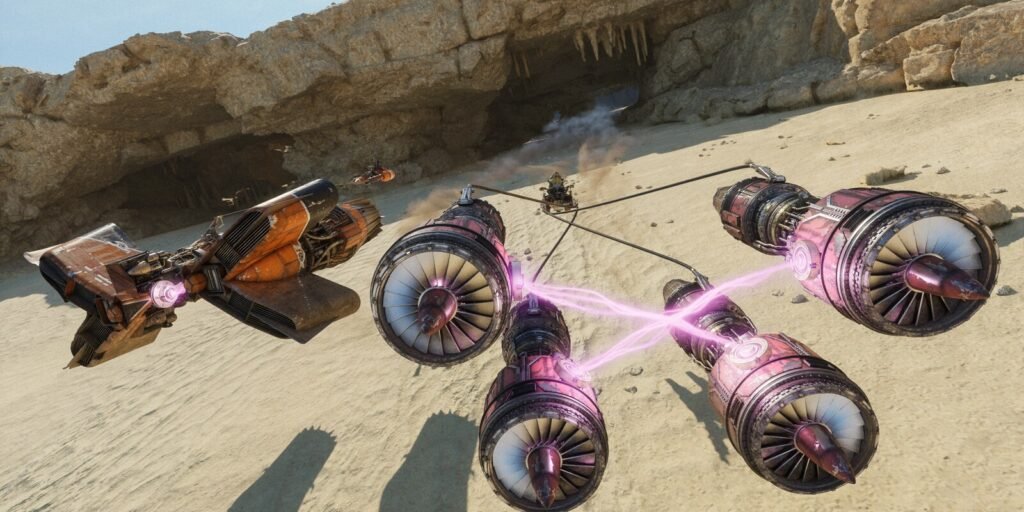
During the main Tour, keep an eye out for Sebulba at the camp. Speaking with him can unlock opportunities to revisit his races and experience his famous podracer yourself.
For fans who grew up watching the high-speed races of Star Wars: Episode I – The Phantom Menace, these events offer a welcome opportunity to experience that classic style of racing.
How to Get Better at Star Wars: Galactic Racer
Becoming a better racer in Star Wars: Galactic Racer requires more than quick reflexes. You need to understand your vehicle, learn the tracks, manage your upgrades, and recognize when it’s worth taking a risk.
Start by choosing a vehicle that matches your driving style and investing in useful early upgrades. Practice unfamiliar tracks and shortcuts in Arcade mode, learn to control Ramjet’s heat, and avoid wasting special abilities when you don’t need them.
During Tour Mode, remember that every decision matters. Spending credits wisely, selecting a sensible route, and surviving difficult races can be more valuable than chasing first place at every opportunity.
As you become more comfortable with the mechanics, you’ll start recognizing the best moments to accelerate, the safest opportunities to overtake, and the component combinations that make your vehicle more effective.
And remember one final rule: when the Ramjet meter is approaching its limit, ease off the boost. Finishing second is usually better than exploding halfway through the final lap.
“Unlock full health, max armor, all weapons, and total chaos in Liberty City! Here is the complete list of all working cheat codes for GTA 3: The Definitive Edition across PS4, PS5, Xbox, and PC.”