
Steam Wishlist Categories Update: Organize & Share Your Games
Valve's latest update introduces Steam wishlist categories, advanced sharing links, and demo notifications. Learn how to organize your massive gaming backlog today!

With the sheer volume of incredible games releasing on the platform every single week, players are adding more titles to their backlogs than ever before. While existing sorting and filtering options have been useful for managing these massive lists, the community has long requested more robust ways to organize their most-wanted games. Today, Valve has answered that call by rolling out a massive quality-of-life update.
The highly anticipated introduction of Steam wishlist categories, alongside advanced search functions and highly customizable sharing features, completely overhauls how you manage your future gaming library. Whether you are tracking upcoming indie gems, looking for Steam Deck compatible titles, or planning your next big Summer Sale purchases, here is everything you need to know about utilizing the brand-new Steam update.
Introducing Custom Steam Wishlist Categories
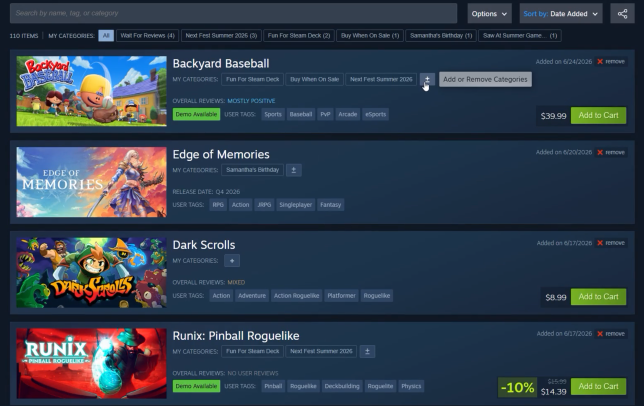
At the forefront of this massive update is the ability to finally create custom Steam wishlist categories and assign them to any game you are tracking. For years, gamers have had to dump everything into one giant, overwhelming list. Now, you have complete control over your curation.
You can create highly specific tags tailored to your gaming habits. For example, you might want to create a category for “Perfect for Controller” games, a list for “Upcoming Co-op Adventures” to play with friends, or even a private collection of games you saw at a recent digital gaming event.
- Quick and Easy Setup: Adding a new custom category is an incredibly fast and straightforward process directly on your wishlist page.
- Seamless Filtering: By simply clicking on a category name at the very top of your wishlist, or next to the “My Categories” area on an individual game’s card, you can instantly filter your massive backlog down to exactly what you want to see.
- Store Page Integration: You don’t even need to visit your wishlist to organize your games. The “On your Wishlist” dropdown menu located directly on any game’s individual store page now allows you to quickly add that specific title to your frequently used categories.
- Customized Notifications: Are you tired of getting email alerts for games you only casually care about? You can now customize your Steam wishlist notifications so that you only receive alerts for specific, high-priority categories.
Advanced Ways to Share Your Steam Wishlist
Sharing your wishlist with friends has always been a feature, but it previously lacked nuance. With this new update, Valve has completely revamped how you show off your most-wanted games. You can now share a link that directs users to a specific category or a heavily filtered view of your list.
When you click the share button at the top of your wishlist, Steam generates a unique URL that you can send to family and friends. The best part? Even if your core wishlist privacy settings are set to “Private,” anyone with this unique link can safely view the curated list you decided to share. If you ever change your mind, these secure links can be revoked by you at any time.
This specific filtered sharing is perfect for special occasions. For instance, you can create a “Birthday List” category containing five games you really want this year and share that specific link with your family. Thanks to this shared link, family members who do not even have a registered Steam account can purchase and send those games directly to you as gifts!
Quality of Life Improvements and UI Upgrades
Beyond the major categorization and sharing features, this update brings a host of smaller, yet incredibly impactful, improvements to the overall user experience.
Enhanced Search and Micro-Trailers
Navigating your list is now smoother than ever. Valve has heavily improved the search experience on the wishlist page by implementing a snappy auto-complete feature, delivering your search results much faster. Additionally, hovering your mouse cursor over any game’s capsule image will now play a quick micro-trailer, allowing you to instantly remember what the game looks like without having to click through to the main store page.
Never Miss a Steam Demo
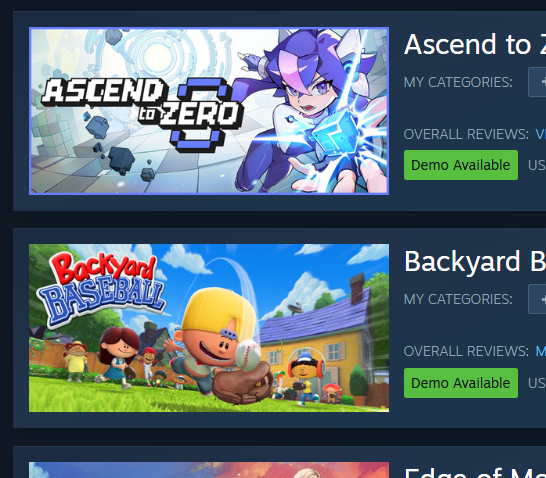
Demos have made a massive comeback in recent years, especially with the popularity of Steam Next Fest. Now, your wishlist will clearly display an indicator if a game currently has a playable demo available. Furthermore, you can opt-in to receive direct notifications the moment a demo is published for any game sitting on your wishlist.
Cross-Platform Navigation and Readability
Valve knows that gamers switch between devices constantly. Whether you are browsing on a desktop web browser, the mobile app, the native Steam client, or lounging on the couch with SteamOS on your Steam Deck, the system is now much smarter. When you navigate away from your wishlist and come back, Steam will remember exactly where you left off, returning you to your last viewed page. Finally, several visual tweaks have been made across the board to improve color contrast and overall text readability.
By taking full advantage of the new Steam wishlist categories, you can finally turn that chaotic list of 500 games into a perfectly organized, highly shareable, and easily navigable catalog!